
Rivian
Rivian, LLC.Auto & Vehicles
3.0360.00 Reviews
- Version
- 3.18.0
- Installs
- 100.00K
- Age Rating
- Everyone
Screenshots
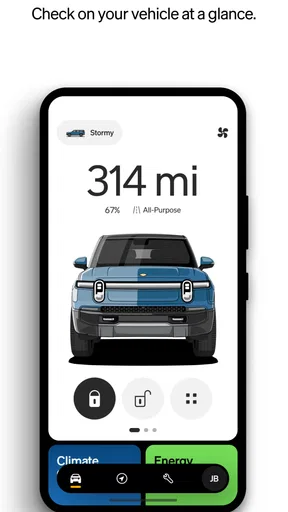
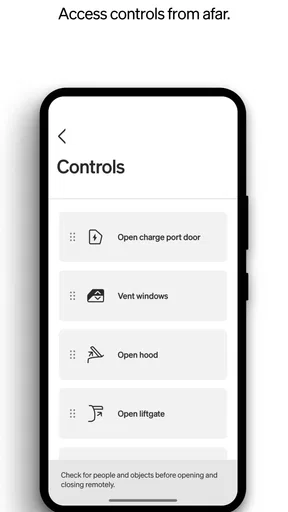
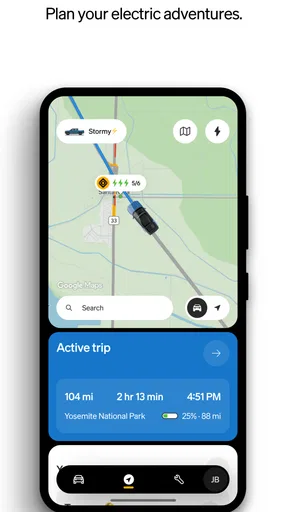
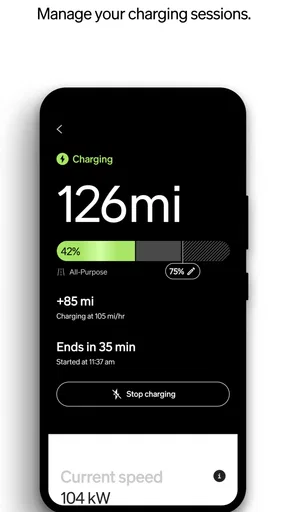
Our Review of Rivian
 Analysis by Appyee
Choosing a vehicle companion app is different from choosing a general travel or navigation tool. The right option depends first on what you drive and how much of your daily routine is tied to that vehicle. I spent time looking at Rivian as an owner-focused mobile app rather than treating it like a universal motoring utility, and that distinction matters. It is a free app from Rivian, LLC. for the Auto & Vehicles category, designed around the relationship between a driver and a Rivian vehicle.
My overall view is that the app makes the most sense when you already own, or are seriously considering, a Rivian. It is not the kind of download I would recommend simply because someone wants a better map, a fuel-price finder, or a broad car-maintenance organizer. Its value comes from keeping vehicle-related tasks close at hand and reducing the need to return to the car for every small interaction. That focus is also its biggest limitation.
The app has been available since September 17, 2021, and its current version is 3.15.0. It carries an average rating of 3.1 from around 700 ratings and has passed 50,000 installs. Those numbers suggest a product with a real user base but also room for a more consistent experience. I would treat the rating as a reason to test it carefully on your own phone, not as an automatic verdict.
How I Would Decide Whether Rivian Is Right for Me
I’d judge the app by whether it makes a recurring part of Rivian ownership easier, rather than by how interesting it feels on the first day. I’d start with one or two tasks I expect to use routinely, then notice whether the app fits naturally into my departure and parking habits. That gives me a practical basis for deciding whether it deserves a lasting place on my phone.
Start with the vehicle relationship, not the feature list
The first question is simple: do you have a Rivian to manage? If the answer is no, the app has little reason to become part of your routine. A generic navigation app, your phone’s built-in car integration, or a maintenance app that works across brands will usually offer broader value. Rivian is a specialized companion, and specialization is useful only when it matches your ownership situation.
For a Rivian driver, the decision is more practical. I would consider whether I want a phone-based way to interact with the vehicle between drives, whether I regularly need to check the vehicle before leaving home, and whether I prefer one manufacturer-specific place for ownership tasks. Those questions are more revealing than a quick glance at the store summary, which simply describes the experience with the phrase “Adventurous Forever” and identifies the app as Rivian.
I would also think about reliability expectations. A vehicle app is not just another social or entertainment download. If I am using it before a trip, I want the information and controls I depend on to feel clear and predictable. A polished interface is pleasant, but dependable behavior matters more when the app is part of a morning departure, a charging stop, or a check from indoors.
What I would use it for in everyday life
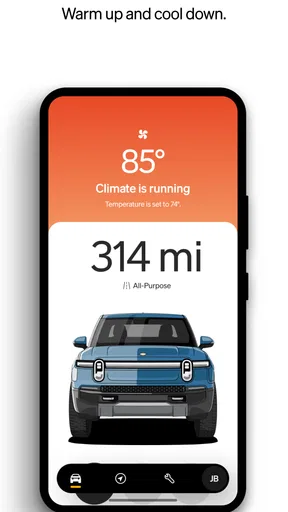
A realistic scenario is getting ready to leave on a cold or wet morning. Instead of walking outside immediately, I can open the Rivian app and begin my vehicle routine from the phone. That may sound like a small convenience, but repeated small conveniences are exactly where an owner app earns its place. The benefit is not that it replaces every other driving tool; it is that it gives vehicle-specific actions a single, familiar home.
Another useful situation is checking the vehicle while I am away from it. At a supermarket, workplace, or campsite, I may want to confirm the vehicle’s state before deciding whether I need to return. That kind of glance is more relevant to an owner than a generic map view because it connects the phone to the actual vehicle rather than to a route or destination.
I would also use it as a preparation tool before a longer outing. The app can sit alongside a separate navigation service: one handles the journey and destination planning, while Rivian remains the place I check for the vehicle itself. That division of labor is important. Expecting one app to do everything often creates a worse experience than using two focused tools.
The less obvious benefit: reducing small interruptions
The strongest insight I took from this kind of app is that convenience is cumulative. A vehicle companion does not need to transform driving to be useful. If it helps me avoid several unnecessary trips outside, remember where I should look for vehicle information, and keep ownership tasks separate from unrelated phone clutter, it can become a quiet part of my routine.
That benefit is easy to miss because it is not dramatic. It appears in the moments between journeys: before leaving, after parking, while checking on the vehicle from a distance, or when preparing for a trip. I would judge Rivian on how well it handles those transitions rather than on whether it can replace a dedicated navigation or roadside service app.
Who should skip it
I would skip Rivian if I drive another brand and only want general automotive information. The app’s manufacturer-specific focus is not a disadvantage for its intended audience, but it makes it a poor substitute for cross-brand tools. I would also look elsewhere if my main need is advanced route planning, traffic awareness, public transport, fuel comparison, or a complete maintenance log. Those are different jobs.
People who rarely use their phone around the vehicle may not gain much either. If I am comfortable handling every task directly from the car and do not care about checking it remotely, installing a dedicated companion app can feel like adding another account and another notification source without enough payoff.
Where the app wins against broader alternatives
Rivian’s clearest advantage is focus. A general automotive app has to serve many makes, models, and ownership styles. A manufacturer-specific app can make the vehicle relationship feel more direct because I am not translating generic labels into Rivian-specific actions. That focus can also make the app easier to remember: when the task concerns my Rivian, I know where to start.
It also wins on continuity. A navigation app is usually concerned with getting me somewhere. A maintenance tracker is concerned with records. A roadside service app is concerned with assistance. Rivian occupies the space between drives, where the vehicle itself remains part of the conversation. That makes it a better companion than those alternatives for ownership-oriented checks and preparation.
Another advantage is that the app is free. There is no purchase price standing between a Rivian owner and the official mobile companion. I still would not call that “free” in the broadest sense, because the app’s usefulness depends on owning a Rivian and accepting its place in my digital routine. But compared with buying a separate vehicle-management tool, the entry cost is straightforward.
Where a different category fits better
If I am planning a complicated road trip, I would use a dedicated navigation service as well. Navigation specialists tend to be better suited to route alternatives, live traffic decisions, and destination discovery. Rivian should not be judged harshly for not being a universal travel planner; that is simply not the job I would assign to it.
For records, a maintenance organizer may be the better choice. Someone who owns several vehicles, tracks service history for resale, or wants brand-neutral reminders will probably prefer an app built around logs rather than one manufacturer’s ecosystem. Similarly, drivers who compare running costs across vehicles may want a fuel or expense tracker instead.
The same principle applies to emergency support. If I want a tool whose central purpose is roadside assistance, I would choose a service designed for that task. Rivian can be part of my ownership toolkit, but I would not make it my only answer for every problem that can happen on the road.
Practical trade-offs before installing
The first trade-off is account and ecosystem commitment. A specialized app is most useful when I am willing to keep using the manufacturer’s digital environment. That is convenient for a single-brand owner, but less attractive if I prefer to keep everything inside independent services. Before installing, I would ask whether I want an official companion or merely another way to view generic vehicle information.
The second trade-off is notification discipline. Vehicle apps can be helpful when they surface something I genuinely need, but any app that stays connected to an important part of daily life can become distracting if notifications are too frequent. I would review notification settings after installation rather than accepting every prompt automatically. Keeping only useful alerts makes the app feel like a tool instead of background noise.
The third trade-off concerns phone dependence. A phone-based companion is convenient when the phone is charged, connected, and nearby. It should complement the vehicle’s own controls, not become the only method I trust. For important actions, I would still verify the vehicle directly when practical, especially before setting off on a long journey.
What switching to Rivian feels like
If I am moving from a generic car app, the initial adjustment is learning that Rivian is not meant to be a dashboard for every automotive need. I would keep my navigation, expense tracking, and service records where they already work well, then add Rivian only for the brand-specific layer. That approach avoids the common mistake of deleting useful tools before knowing what the new app actually replaces.
If I am moving from no vehicle app at all, the change is smaller but still requires a new habit. I would install it, sign in, explore the main vehicle-related areas, and then use it during ordinary moments rather than waiting for a major trip. Checking it before leaving home and after parking is a better test than opening it once and judging the interface immediately.
There is also a psychological cost to switching: I have to remember which app handles which task. My recommendation is to create a simple division. Use Rivian for the Rivian relationship, a navigation tool for route decisions, and a separate organizer for records if those matter to me. Clear boundaries prevent duplicated work and make it easier to notice whether the official app is genuinely saving time.
Version, accessibility, and everyday suitability
The current version is 3.15.0, so I would keep it updated rather than relying on an old installation. Vehicle companions can change as the manufacturer refines the ownership experience, and updating is the most sensible way to avoid missing improvements or compatibility fixes. I would also check that my phone’s operating system and notification settings allow the app to work in the way I expect.
Its content rating is Everyone, which fits the app’s practical purpose. That does not mean every driver will find it equally suitable. A person who wants a simple, brand-neutral tool may still find the focused design too narrow, while a Rivian owner may appreciate that it does not try to become a general-purpose automotive portal.
The public reception is mixed enough that I would leave room for personal variation. An average of 3.1 is neither a strong endorsement nor proof that the app is unusable. Phone model, software environment, connectivity, and individual expectations can all affect how a connected vehicle app feels. I would test the actions I actually need instead of assuming that a rating alone predicts my experience.
My recommendation for different drivers
For a current Rivian owner, I recommend installing it. The app is free, directly relevant to the vehicle, and most useful in the small spaces around a journey: preparing to leave, checking in from a distance, and keeping ownership tasks close to the phone. I would not expect it to replace navigation, maintenance records, or every other driving service, but I would give it a fair trial as the official companion.
For someone considering a Rivian, I would treat the app as one part of the ownership picture. It can show how the brand approaches the relationship between vehicle and phone, but it should not be the sole reason to choose a vehicle. I would focus first on the car itself, then decide whether this connected layer fits my habits and expectations.
For everyone else, I would skip the download unless I have a specific reason to interact with Rivian. A general automotive app will probably give broader value, and a dedicated navigation or service app will usually be stronger at its own specialty. Installing Rivian without a Rivian-related use case is unlikely to improve my daily driving routine.
My final judgment is therefore deliberately narrow: Rivian is worth using when the vehicle is already part of your life, not as a general-purpose car app. Its focused role is its strength, and its limited audience is the trade-off. I would recommend it to owners who want a convenient phone-side connection, while advising everyone else to choose a tool built around the task they actually need to solve.
That is the way I would approach the download. I would not be persuaded by the adventurous wording alone, and I would not dismiss the app because its rating is moderate. I would ask whether I own the right vehicle, test the everyday workflow, keep separate tools for separate jobs, and then decide whether the convenience is worth keeping. For the right driver, Rivian can become a useful part of ownership; for the wrong driver, it is simply too specialized.
Privacy and Permissions
See what permissions an app requests and how it handles your data.
- Calendar
- read calendar events plus confidential information, add or modify calendar events and send email to guests without owners' knowledge
- Contacts
- read your contacts
- Location
- approximate location (network-based), precise location (GPS and network-based)
- Photos/Media/Files
- read the contents of your USB storage, modify or delete the contents of your USB storage
- Storage
- read the contents of your USB storage, modify or delete the contents of your USB storage
- Camera
- take pictures and videos
- Wi-Fi connection information
- view Wi-Fi connections
- Other
- view network connections, pair with Bluetooth devices, access Bluetooth settings, change network connectivity, full network access, run at startup, control vibration, prevent device from sleeping, read Google service configuration
Verdict
Strengths of Rivian
- Intuitive controls make vehicle features easy to access.
- Over-the-air updates can add improvements without a service visit.
- Useful charging tools help plan routes and monitor charging status.
- Clean interface presents vehicle information without unnecessary clutter.
- Remote controls let you check and manage several car functions.
Limitations of Rivian
- Many features require an active Rivian vehicle and compatible account.
- Some controls may respond slowly when the connection is weak.
- Battery and location data may raise privacy concerns for some users.
- The app can use noticeable battery power with frequent background updates.
- Limited usefulness for people without access to Rivian’s charging network.
Similar Picks in This Category
View All
Android Auto
Google LLC4.1

maxim — order a taxi & food
PT. SITO4.7

Штрафы ГИБДД: проверка с фото
Pays LLC – Штрафы ГИБДД4.7

Номерограм – проверка авто
Авто Ассист4.8

Дром Авто
Дром4.9

Frequently Asked Questions
What is the Rivian app used for?
The Rivian app is the companion application for Rivian electric vehicles, including the R1T pickup and R1S SUV. After signing in with your Rivian account, you can check battery level, estimate range, view charging information, lock or unlock the vehicle, adjust climate settings, locate the vehicle, and review important vehicle details remotely.
Can I use the Rivian app without owning a Rivian vehicle?
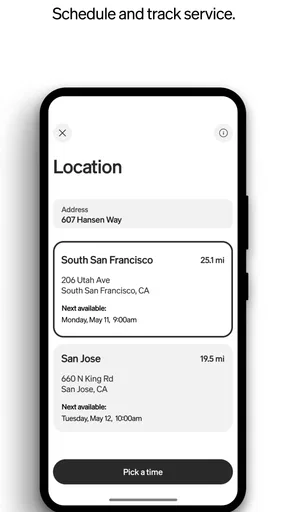
You can download and explore the Rivian app without owning a vehicle, but most useful features require an active Rivian account connected to a Rivian vehicle. The app is primarily designed for owners and customers managing an order, delivery, service appointment, charging activity, or vehicle settings. Some information may be available before delivery, depending on your account status.
Does the Rivian app allow remote control of the vehicle?
Yes, the app provides several remote controls when your vehicle is properly connected to the internet and your account has the required permissions. Depending on the model and software version, you may lock or unlock doors, start climate control, check charging status, locate the vehicle, and perform other actions. Remote commands can be delayed by weak connectivity.
Can I schedule charging and monitor battery status in the Rivian app?
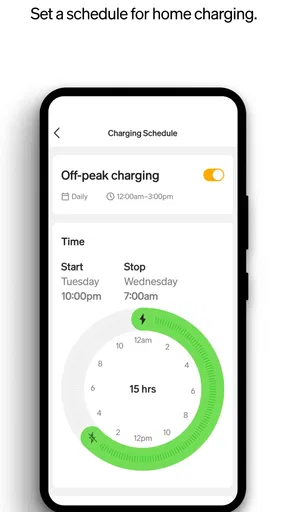
The Rivian app lets owners monitor battery percentage, estimated driving range, charging progress, and, where supported, charging-related settings. You can use it to check whether the vehicle is plugged in and determine when charging has finished. Available scheduling options and controls may vary according to the vehicle software, charger, location, and regional features.
Is the Rivian app free to download, and what permissions does it require?
The Rivian app is generally free to download from the official Android or iOS store, although owning or ordering a Rivian vehicle involves separate costs. To provide its main features, the app may request access to notifications, Bluetooth or nearby devices, location, and mobile data. You can manage permissions in your phone settings, but restricting them may affect functionality.
